Translate

Sybase Installation and Administration

Appendix E: Sybase Installation and Administration


Overview of the Sybase Client/Server Architecture

The Sybase Adaptive Server is the server in the Sybase client/server architecture (see Figure E-1). It manages multiple databases and multiple users, keeps track of the actual location of data on disks, maintains mapping of logical data description to physical data storage, and maintains data and procedure caches in memory.
The policy database is a set of database schemas in which all data are stored. The Sybase database contains a set of related data tables and other database objects organized and presented to serve a specific purpose.
A database device is a Sybase term that represents the portion of a device (a portion of a hard drive, such as a partition) that is dedicated to holding database data. When creating the database device, you can choose either a raw partition or an existing file system. Choosing a raw partition can increase the performance of the database server.
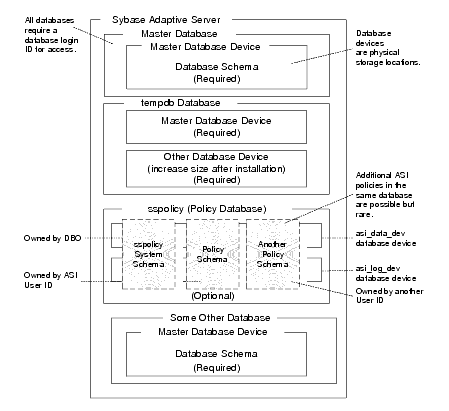
Figure E-1 Sybase Adaptive Server Setup
Sybase Adaptive Server Setup
The Database Login ID is a login created by a system administrator to log onto the Adaptive Server. Each Database Login has a password and a default database to access. A login is valid if the Adaptive Server has an entry for that user in the system table syslogins.
The Database Administrator (DBA) has a special database login ID that can access all databases in the Adaptive Server. The DBA is also referred to as the system administrator. In fact, the name of the DBA login is sa (for System Administrator).
The Database Owner (DBO) is a special database login with permission to perform all actions on a policy database. Usually, the login that creates the database automatically becomes the DBO. The Database User ID is dbo (lowercase), which is different from its Database Login ID. For your policy database, you can use any Database Login ID as the DBO.
The Database User ID pertains to one specific database and is a login given permission by the DBO or DBA (system administrator) to access that one database. In most cases, the database user ID is the same as the Database Login ID. However, in some cases, they may be different, as with the special dbo user ID.
A database schema is a collection of objects associated with a particular schema name. The objects include tables, views, domains, constraints, assertions, privileges, and so on.
The policy owner is a Database User ID that controls the set of database schema in the database. It is recommended that you not use dbo as a policy owner because it requires special administration. The security architecture allows multiple policy owners in its database, each owning a policy different from the other policies.


Sybase Database System Requirements

Table E-1 describes the minimum requirements for the system on which the Sybase Adaptive Server is installed.
Table E-1 Sybase Database Minimum Requirements 
Requirement
Description
Software Version
Sybase Adaptive Server Enterprise 12.5.3.
Server Platform
Any platform supported by Sybase.
Memory
As required by Sybase server installation (42 MB minimum).
Disk space for the database
As required by Sybase server installation.
Disk space for Sybase software
Refer to the Sybase installation guide for details.
Policy database disk space
A minimum of two database devices is required, each having 250 MB.
Required Sybase page size
8K page size required for schema.


Installing the Sybase Database

This section provides recommendations for installing and configuring the Sybase database. If the database is already installed, you can skip this procedure and go to Creating Sybase Database Devices.
To install the Sybase Adaptive Server, perform these steps:
  1. Install the Sybase Adaptive Server database software following the installation instructions in the Sybase Adaptive Server Enterprise Installation Guide. When the Sybase Installer displays the Configure New Server screen, select the Configure New Adaptive Server and Configure New XP Server checkboxes and proceed with the installation.
  2. When the final installer screen appears, select the Yes, restart my computer radio button and click Finish.
  3. Note:By default SYBASE names the database server based on your machine name.
  4. After the machine restarts, start the SYBASE Server (Sybase SQLServer) manually.


Creating Sybase Database Devices

The policy database requires at least two database devices, each having at least 250 MB of free space. The first device stores policy data and the other stores the transaction log. These must be created before creating and configuring the policy database.
Note:For better performance, a raw partition is recommended as the best configuration for the database device. Sufficient disk space must be allocated to ensure that the database meets performance requirements.
To Create Sybase Database devices on the Windows platform, perform the following steps:
  1. To start the Sybase Central tool, click Start>Programs>Sybase>Sybase Central Java Edition. The Sybase Central tool opens.
  2. Click Tools, select Connect and log in as user sa (no password required). The Sybase Central screen appears as shown in Figure E-2.
  3. Note:By default, user sa does not have a password.
    Figure E-2 Sybase Central

    Sybase Central
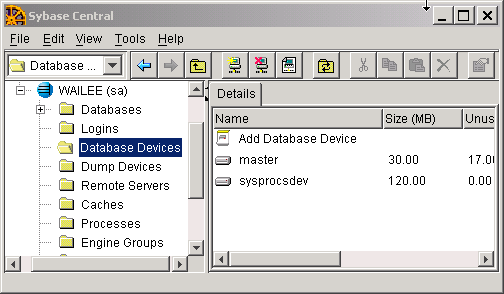
  4. Expand the Sybase Database server node in the left pane (shown as WAILEE in Figure E-2) and click Database DevicesAdd Device Database appears in the right pane (see Figure E-3).
  5. Figure E-3 Add Database Device Screen

    Add Database Device Screen
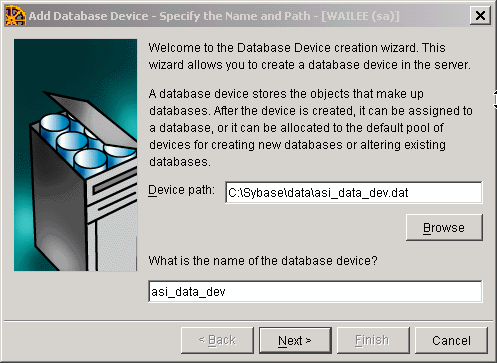
  6. Double click Add Database Devices. The Specify the Name and Path screen appears (see Figure E-4).
  7. Figure E-4 Database Device Name and Path Screen

    Database Device Name and Path Screen
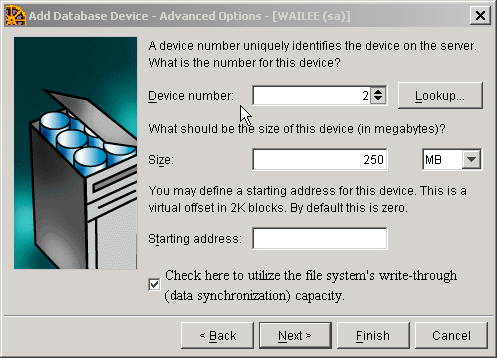
  8. Specify the path (for example C:\Sybase\data\asi_data_dev.dat) and the device name (for example asi_data_dev) and click Next. The Add Database Device - Advanced Optionsscreen appears (see Figure E-5).
  9. Figure E-5 Sybase Add Database Device - Advanced Options Screen

    Sybase Add Database Device - Advanced Options Screen
  10. Set the Device number to 2, Size to 250 MB, select Check here to utilize... checkbox, and click Finish.
  11. To add database device asi_log_dev, repeat steps 4 to 6, but set the database device name to asi_log_dev instead of asi_data_dev, and click Finish.
Note:For instructions for creating Sybase database devices on Solaris and Linux, the Sybase documentation.


Administering the Sybase Policy Database

Table E-2 lists and describes the batch and shell files provided for database administration. The files are located in the BEA_HOME\ales32-admin\bin directory.
Table E-2 Database Administration Utilities 
File Name
Used to:
policyexporter.bat
policyexporter.sh
Exports policy data. See the Policy Managers Guide for information on how to export policy. The dbtype is the type of database, Sybase or Oracle.
install_ales_schema.bat
install_ales_schema.sh
Installs the policy database schema. See Installing the Policy Database Schema for information on how to install the database schema.
uninstall_ales_schema.bat
uninstall_ales_schema.sh
Uninstall the policy database schema from the database server. The parameters for this script are the same as the install_ales_schema script.


Backing Up a Sybase Database

The policy database should be backed up at regular intervals and before uninstalling or re-installing the policy database. If necessary, contact a database or system administrator to assist with this process.
Use your established backup procedure or follow these steps:
  1. Login to the Sybase database server as the system administrator, database operator, or database owner.
  2. Note: The database owner is not the same as the policy owner.
  3. Backup the transaction log using the dump transaction command.
  4. Backup the database by using the dump database command.

Note:See the Sybase documentation for further information on using these commands.

1 comment:

Anonymous said...

Was looking for this - interesting information - max

Labels

sap hana hana database aws s4 hana hana db s4hana conversion steps sap hana azure bw4hana hana migration s4hana migration sap cloud migration steps sap hana migration steps sap hana migration to azure s4hana sap fiori fiori performance fiori erp s4 hana fiori sap fiori app sap fiori client sap fiori launchpad sap s4 hana fiori cisco ecc AI SAP AI abap dumps hana sap S/4HANA S/4HANA Conversion best sap ui5 & fiori training configuration database fiori tutorial on webide free sap ui5 & fiori training s/4 hana sap dumps sap fiori tutorial sap ui5 sap ui5 & fiori sap ui5 & fiori tutorial sara ui5cn 2367245 - Troubleshooting performance issues with SAP BPA Amazon free tier for SAP AWS setup Experience CALL_FUNCTION_NOT_FOUND CCMS Configuration and Use Create New Data Class in SAP (Oracle) Critical top SAP Abap dumps DHCP Clients Not Receiving IP Addresses Download Stack.xml HAN-DB HAN-DB-ENG High CPU Usage Due to Excessive Process Switching How To How to Start and Stop SAP Hana Tenant Database How to change SAP Hana Sql Output results are limited to 5000 Records How to perform SAP Dual Stack Split - Netweaver Inactive Objects in SAP Intercompany transactions in SAP AP / AR : Cross Company Code Transaction Interface Flapping Due to Duplex Mismatch KBA LOAD_PROGRAM_LOST MSSQL shrinking transaction log file Migrating to SAP hana database NAT Overload Causing Internet Access Failure Note 500235 - Network Diagnosis with NIPING OSPF Adjacency Not Forming PRINCE2 Foundation Sample Questions Preparing for S/4HANA Conversion and the MUST know items Push to Download Basket S/4HANA Migration Cockpit S/4JANA SAP BI Support Data Load Errors and Solutions SAP BI/BW Landscape SAP BPA SAP Basis SAP Basis Automation SAP Business Objects SAP CPS SAP Certification SAP FI Certification SAP FI Certification Sample Questions SAP HANA Admin - Cockpit SAP HANA DB Engines SAP HANA Database SAP HANA terminate session connection disconnect cancel kill hang stuck SAP Hana DB restore SAP Hana Numeric Error Codes SAP Landscape SAP Language installation SAP MM and Purchase Order Tables SAP Maintenance Planner SAP Note 500235 SAP R/3 Glossary SAP Readiness Check SAP S/4HANA 1709 Installation Files SAP S/4HANA 2023 SAP S/4HANA 2023 Installation SAP S/4HANA 2023 running SAP S/4HANA Installation SAP Scheduling SAP Solman 7.2 CHARM: SAP Support Package Stack Strategy SAP Support package SAP Upgrade SAP support stack upgrade SP stacks STORAGE_PARAMETERS_WRONG_SET SUSE/SLES/Kernel versions Setup of S/4hana 2023 TSV_TNEW_PAGE_ALLOC_FAILED TSV_TNEW_PAGE_ALLOC_FAILED error Transaction ID Unable to download an SAP Note Unix/Linux Command That Are Helpful For SAP Basis Upgrading SAP Kernel Without Downtime Upgrading windows server 2008 to windows server 2019 What is OSS Notes? SAP SNOTE Tutorial accounting agile ale idoc ale/edi archive FI documents audit auditing auditor aws aws cloud basic type bluefield approach ccms ccmsidb charm copilot datavard dbacockpit download sap note download snote edi idoc electronic data interchange enable sap archiving objects erpprep ffid firefighter fraud functional hana admin how to apply sap security note https://www.erpprep.com/ idoc install install sap fiori installation interfaces intermediate document internal control license key linux version materials management messsage niping test order type port prince2 agile prince2 agile practitioner purchasing quick info s4 hana sap abap dumps sap abbreviations sap activate certification sap activate project manager sap authorization sap aws sap brownfield sap ccms sap ccms configuration sap erp sap error sap grc sap greenfield sap internet demo system sap license sap maintenance certificate sap material management sap meaning sap mm sap mm consultant sap monthly security note sap netweaver sap network diagnostic sap niping sap note sap oss sap patch day sap performance sap performance issue sap purchase order sap s/4hana sap sales and distribution sap sap otc sap sd sap sd certification training sap sd course sap sd jobs sap sd module sap sd online training sap sd training sap sd tutorial sap sd tutorial for beginners sap security sap security note sap snote sap snote tutorial sap solution manager sap sql segregation of duties separation of duties sles slicense smc snote snote in sap system sod conflict solution manager solution maneger stop start hana database suse linux techie trex two step upgrade required waterfall