Translate

Showing posts with label bw4hana. Show all posts

What i gather on SAP HANA Database Backup and Recovery

Some updates in SAP HANA don’t just tweak the interface—they actually reshape how you manage critical operations like backup and recovery. Recently, I’ve noticed a few changes that genuinely improve how I handle database protection and restoration.

🛡️ Backup Retention: More Control, Less Risk

One of the most practical changes is the ability to flag backups as retained. This means you can mark certain backups so they’re protected from automatic deletion—whether by scheduled cleanup jobs or manual catalog commands. It’s a safeguard I find especially useful for compliance or milestone backups that you absolutely don’t want to lose.

Before this, I had to rely on external storage policies or naming conventions to protect key backups. Now, SAP HANA lets me lock them in place directly within the system.

🔐 Encrypted Backup Checks: Smarter Validation

Another improvement is with the hdbbackupcheck tool, which now supports encrypted backups. That’s a big deal. Previously, checking the integrity of encrypted backups required extra steps or workarounds. Now, I can validate them just like any other backup, which makes my audit process cleaner and more secure.

🧠 Diagnostic Tools: More Transparency

SAP also enhanced tools like hdbbackupdiag, which help me inspect individual backups in detail. These tools give me a clearer picture of what’s inside each backup file—especially useful when troubleshooting or verifying recovery readiness.

🔄 Recovery Options: Still Robust, Now More Flexible

The core recovery modes—like point-in-time recovery and most recent state—haven’t changed drastically, but the integration with cockpit and command-line tools feels smoother. I can now navigate recovery scenarios with more confidence, knowing that the system tracks backup history even across upgrades.

That’s something I rely on heavily. If a software update goes sideways, I want to be sure I can roll back without losing continuity in my backup catalog.

🧩 Why These Changes Matter to Me

These aren’t just technical tweaks—they’re quality-of-life upgrades. They reduce the risk of accidental data loss, simplify validation, and give me more control over how backups are managed and restored. In a high-stakes environment where downtime isn’t an option, these changes make a real difference.

SAP HANA System Copy- Homogeneous Backup/Recovery Method - I choose this way

There’s something satisfying about setting up a fresh SAP HANA system that mirrors an existing one. The homogeneous system copy method—using backup and recovery—is one of the cleanest ways to do it, especially when both the source and target systems are running on the same platform and architecture.

🧱 What It Means

“Homogeneous” simply means the source and target systems are technically alike—same operating system, same database version, same endianness. So you’re not converting anything, just replicating.

This method is ideal when you want to:

  • Create a test or development system from production

  • Refresh an existing system with updated data

  • Clone a system for training or sandbox purposes

🔄 How I Usually Approach It

Here’s the general flow I follow:

  1. Prepare the Source System I start by making sure the source SAP HANA system is stable and backed up. Using HANA Studio or Cockpit, I perform a complete data backup of the tenant database. I choose a clear naming prefix and make sure the backup directory has enough space.

  2. Transfer the Backup Files Once the backup is done, I copy the files to the target system’s backup directory. This part’s straightforward, but I always double-check the path defined in the global.ini file under persistence -> basepath_databackup.

  3. Install the Target System Using Software Provisioning Manager (SWPM), I begin the installation of the target system. During the process, I select the Homogeneous System Copy option and point it to the backup files I transferred earlier.

  4. Schema and Credentials One thing I always pay attention to is the schema name. If the source system used SAPPRD, I need to enter that same schema during the recovery—even if the target system is called SAPDEV. It’s a common mistake to mismatch these.

  5. Recovery and Validation After the system is installed, SWPM uses the backup to recover the database. I monitor the logs to ensure everything restores correctly. Once done, I validate the system by logging in, checking data integrity, and confirming connectivity.

🧠 Why This Method Works Well

It’s reliable, predictable, and doesn’t require fancy migration tools. Plus, it preserves the structure and data exactly as it was. For environments where consistency is key—like QA or staging—it’s a go-to method.

Of course, it’s not plug-and-play. You still need to handle post-copy tasks like:

  • Changing system IDs

  • Adjusting RFCs and logical system names

  • Reconfiguring interfaces and background jobs

But overall, the backup/recovery method gives you a solid foundation to build on.

SAP Migration Cockpit S/4 HANA ( LTMC) – some sticky notes

SAP Migration Cockpit S/4 HANA ( LTMC) – some sticky notes

S/4 HANA is the only SAP product we mention these days when we talk about SAP. While S/4 HANA was already the best ERP application of all time, it's even better with S/4 HANA. The fact that SAP will no longer support ECC 6.0, the previous version, in 2026 means that big companies around the world will be rushing to switch from ECC to S/4 HANA. SAP consultants must be ready to upgrade to S/4 HANA until that time arrives, and take advantage of this opportunity to grow as SAP S/4 HANA consultants.

S/4 HANA Migration Cockpit (Transactions – LTMC) tips and tricks will be discussed in this blog. Thanks for reading.

Transfer Data from File will be the topic of discussion.


Mass transfer ID & Data retention time

When a new project is created in the system, a Mass Transfer ID is automatically generated for that project's files. To distinguish between projects across systems, this ID is used. The mass transfer ID must be unique across all systems if we want to copy project-specific settings (Template customizations, value translations in convert values, duplicate check, etc.) to different systems. Quality settings can be transferred to Production in the same way.

A temporary file is created in the system when using the SAP S/4HANA migration cockpit to transfer data into SAP S/4HANA using a file. As well as cached information, this includes data from any uploaded files and any other data used to complete the transfer. It is possible to specify the number of days that this data will be stored in your system after the file has been transferred. When the data retention period expires, the data will be removed from the SAP system. Without a value in this field, the data will remain in the system.

  1. Use the same project across all the systems

It is highly recommended to avoid using the same project (same Mass Transfer ID):


Doubling up on template customization, converting values, and so on.

As a result, LTMC cannot be used to create identical records (same key combination) using a Mass Transfer ID.

It's possible to migrate an entire project's configuration using LTMC's IMPORT and EXPORT functionality

  1. Correct the data only in the Source file

 Check for simulation errors, cancel current run and delete source file from LTMC after you've retrieved the list of errors. Correct the data in the source file and rerun the simulation in LTMC.

  1. Inconvenient error log

 Error logs are not properly formatted in any LTMC step. Two lines are required to display the error record number and description, which can be difficult to manage when dealing with millions of data records. Rework the error log and transform the data so that it is easily understood by the business, and correct any data errors that may have been introduced.

  1. Avoid creating duplicate records

Migration cockpit's concept is very similar to SLT's. There is a restriction on the system's ability to generate duplicate records. In the table DMC FM RESTART, the system keeps track of the records that have already been created. To be clear, this table does not depend on the client. This means that the system prevents duplicate data not only within a single client, but across all clients as a whole. Although there are ways to modify the table and reload the same records in different clients, there are also ways to modify the table.

  1. Delta files do not have error details, download the errors before finishing the data load

 After the data load is complete, MC creates a delta file that contains the failed records that were not loaded during the data load process. Nevertheless, that file does not contain the relevant errors corresponding to the data records in the data file. Prior to the data loading process, you must store all error records locally.

  1. Client dependent Template customization 

In order to migrate objects with MC, SAP has provided load templates. The transaction code LTMOM can be used to customise the templates if needed (Migration object Modeler). Once you've finished customising your template, you'll need to SAVE & REGENERATE your object. For each modified object that is re-generated, SAP creates at run time a new programme which is called when you perform a Data Load on that particular modified object's data. Because of this, it's not uncommon for SAP systems to have multiple clients for the same system. The data load can be done in the same client that customised the template. Because of this, the LTMC will not work, and it will not produce an error message as well. Under ST22 (ABAP runtime errors), you'll find a run time error under your ID in the back-end, however.

  1. Do not provide external numbers, when the system is configured with internal numbering 

Think about a Vendor Master BP group where the system is configured to use internal numbering. Otherwise, the system will throw an error saying that external numbering is not allowed if you enter external numbers in the Vendor Number column (incremental starting from 1). You can also use values such as A1, A2, A3, etc. instead of using an incremental number starting at 1.

  1. List of Mandatory fields( * ) may differ in LTMC template & system configuration perspective 

The template's list of required fields and the S/4 screen's list are distinct. In LTMOM you can customise the list of mandatory fields on the template while in SPRO you can customise the list of mandatory fields on the screen. Before the MD team begins loading the data, functional consultants perform this step. This means that even though a field may not be mandatory on the screen, it must be filled in before you can proceed with the data load. According to the screen configuration, the template should be customised accordingly.

  1. No change functionality, difficult to change/correct already loaded records 

LTMC does not yet have a change functionality. As a result, once the data has been loaded, LTMC will not allow you to change it. As a result of this, we may need to use mass update transaction codes (MASS/MASSD) or an ABAP programme. However, SAP no longer recommends LSMW in S/4. Any usage by the customer is at their own risk.

  1. Files should not contain duplicate records 

If you want to run LTMC, you must remove duplicate records. If a file contains duplicate records, you won't be able to load it into any project.

To help you with your daily activities on Migration Cockpit, I hope this blog will be of assistance to you. With the help of LTMOM I will be able to customise migration templates in my next blog post.

Conversion to SAP S/4HANA – How to handle errors during finance data migration

 In this blog series, we are looking at some of the challenges and risks that most commonly affect SAP S/4HANA conversion projects and how to mitigate them with the right selection of tools and approaches.

In the previous blogs, we

In this blog, we will discuss how to handle errors during the finance data migration phase of S/4HANA Conversion.


Start with data cleansing in the source ERP system as early as possible

Analyzing the quality of your data and performing a data cleansing can last weeks or even months. Therefore, it is very important to identify any configuration/data quality issues well in advance before your SAP S/4HANA conversion project starts. In the SAP ERP system, we have various programs available in the system for checking financial data. For checking the consistency of configuration and mandatory pre-requisites, it is the Simplification Item Check you should run in your SAP ERP system. For checking the consistency of transactional data, it is the new Reconciliation prior to S/4HANA Conversion program where we ported migration relevant G/L checks from S/4HANA to SAP ERP.  Besides, we have a number of older consistency check programs such as programs for GL – Sub ledger reconciliation, comparative analysis program and technical check of documents tables program. You may refer to blog SAP S/4HANA- Consistency checks in Finance: Part 1 for detailed information.

Perform several test conversions

One of the common problems with Conversion of Accounting was that pre-check tools available in the SAP ERP were not able to detect all migration relevant data inconsistencies. The checks accessible after the technical installation of S/4HANA and executed as a part of the data migration process are more advanced than old check programs in ERP. The only way to detect all inconsistencies was to run S/4HANA test conversion on a copy of productive data.  The situation has improved considerably with the release of SAP Note 2755360  which ships the new Reconciliation prior to S/4HANA Conversion program (transaction FIN_CORR_RECONCILE). The new tool contains the subset of checks which are normally executed during the finance data migration. Currently, only General Ledger checks are covered as a part of the new tool. For other finance application areas such as asset accounting, still, the best way to make sure that migration relevant data inconsistencies are discovered is to carry out one or several iterations of S/4HANA conversion tests. Experience has shown that for larger system one test isn’t sufficient. Having at least two S/4HANA Conversion tests in an SAP system, which is the recent copy of the productive system will have a positive impact on your data quality. The data quality results of these conversion tests are important for further data cleansing activities.

Error handling

The errors can be detected during different stages of a conversion project. Ideally, you discover and correct all data inconsistencies in the source SAP ERP system before starting conversion. The data inconsistencies can be detected with Analyze Transactional Data program after technical conversion or during data migration with programs which are executed after each migration activity automatically. Regardless of the stage at which the error is detected, as a general rule, you need to analyze each error, find its root cause and correct it if possible.

1. Analyze the error

Even though there are many hundreds of possible error messages types (almost 1000 error message numbers in the respective migration message classes FINS_RECON, FINS_FI_MIG, FINS_ML_MIG…), in the majority of conversions you will have to face only several error types. Besides, the error types are very often interdependent, it means that multiple error messages can have a single cause.

Sometimes, already the long text of an error message provides sufficient information to resolve the issue.

If not, a good starting point is SAP KBA Note 2714344  Financial data migration to SAP S/4HANA: Most frequent Error Messages – Information and Recommendations where you can find the list of most frequently occurring error messages together with details about possible root causes, impact, and course of actions. Here you can also identify errors that can be safely accepted.

You can search the SAP Support Portal for coding corrections of migration programs using the reported error number as a search term and component FIN-MIG.

2. Identify the root cause

There are multiple reasons for error messages to occur: you may have inconsistent data in the source system, you may have wrong or missing configuration or there may be a coding error in the migration programs. Sometimes, if affected data is old, it might not be worth it or possible to determine the root cause.

3. Correct  the error

As a general rule, all errors should be corrected. If the error is due to configuration for migration you might be able to fix the configuration in technically already converted S/4HANA system. There are cases when the relevant configuration error can be resolved only in the source SAP ERP which means rolling back the whole technical conversion phase and starting again. However, If you ran the simplification item check, these kinds of configuration problems could not have escaped your attention.

If the error is because of a bug in the standard migration programs, implement the correction Note, reset and repeat the stopped migration activity.

If the error is due to transactional data inconsistency, you need to correct it in the source production system. The data cleansing in the source system must be completed before the next test S/4HANA conversion cycle to assure that the results are taken into consideration. During test conversion, it is OK to accept such an error for the sake of completing the actual test cycle.

Another way how to deal with old inconsistent data is to archive them.

4. Report an incident

In case you fail to identify the root cause, impact, or correction shall be done by SAP, you can report an incident.  You always have to analyze the error beforehand and thorough documentation of your analysis for validation. When SAP accepts to support the issue, the corrections if any will be done only in the production system. (GT It means that if you want to be sure to solve the error in the next conversion run you need to execute a new copy of the production environment on your system to be converted) No corrections will be done in the migration system. Please see the SAP Note 2643232 – SAP S/4HANA migration: Accepting FINS_RECON ** errors

What is handled as a part of SAP support

The issue may be the result of custom code error, modifications or by incorrect handling of the software. For example, you changed the line item or open item management of GL account master data without following the proper procedure. Or your custom program inconsistently updated the tables. In that case, you will be offered a Spot consulting from SAP which is a chargeable service. You can refer to SAP Note  2414374 – Process followed during handling of Spot consulting incidents in Financial Inconsistencies for more details.

Errors during productive conversion

Even though you ran several test conversions, there is a small chance that an unknown, previously undetected error pops up during productive conversion run. There are several possible reasons, for example, the error could be introduced into the system in the time window between the last test run and productive run. During productive conversion, the most important thing is to minimize idle time. Therefore, it is very important to make sure that you can make fast and effective decisions about errors. Before starting the conversion, you should agree with all stakeholders on the error handling process.

When an error can be accepted

There are several scenarios when it makes sense to accept the error without correcting it.

Examples:

  1. Data inconsistencies in tables which are outdated in S/4HANA. A good example is an inconsistency between application indexes and document line items tables BSEG – Error message numbers FINS_RECON 220 – FINS_RECON227 Fields in XXX do not match. These are the cases when values of some fields differ between index and document tables in the source SAP EPR. If you verify it is data in BSEG which is correct, you do not have to rectify data in application indexes. These tables are not used in S/4HANA and their content is moved to backup tables.
  2. Rounding differences
    • The result of past local currency changeover project (euro conversion, the introduction of new currency…). These rounding differences are considered as normal. Please refer to the SAP Note 2781513 – High number of immaterial differences identified during conversion to SAP S/4HANA
    • Planned ordinary depreciation rounding in totals table ANLC. Please refer to SAP Note 2328351 – FINS_RECON 761 for small NAFAP differences.
  3. Line items Inconsistencies in the closed years  – they have minimal impact on reporting if totals are correct
    • Error FINS_FI_MIG 123 ”CO document XXX: more than 3 COEP items assigned to ACDOCA item”. If the affected CO documents are from old fiscal years, you can accept the errors in the migration cockpit. As a result, these items will not be migrated to ACDOCA. The CO totals will be corrected by the migration of balances (step DLT), so there should not be an impact on reporting and operations by the missing items.
    • FINS_RECON 766 ”MISMATCHED BALANCE FOR ANLP”.  If the error is raised for closed fiscal years, check if the aggregated totals per fiscal year between original ANLP and ACDOCA view are the same. In this case, there would only be a difference in the posting periods. In this case, the error message could be accepted. Alternatively, you can archive the ANLP table.
  4. “False positives“
    • Group assets – Errors FINS_RECON772 No entry in original table item for entry in compatibility view ANEK, FINS_RECON744 Mismatched amount ANEP, FINS_RECON781 Mismatched balance for ANEA. These errors can be accepted since they are related to the deviation from the sequential number (LNRAN) of the existing group asset. You find more details in the SAP Note 2508546 -Error messages in the context of migration of group assets
    • Non-productive company codes without data – Error FINS_FI_MIG 002 NO FI-GL aggregates for ledger &1, company code &2 exist. In case the company code is not productive, the error message can be ignored. Please refer to SAP Note 2424125 – Migration to S/4 HANA: No GL Balances.

Conclusion

To successfully migrate the existing transactional data, they must be clean and consistent. It is likely that you are going to have at least some errors in it. Therefore, rapid and efficient error handling is important part of any S/4HANA conversion project.  Please let us your experience know in the comments below!

Brought to you by the SAP S/4HANA RIG

SAP HANA Hands on tests ( part 1 ) : HANA DB installation

 This is a blog series about some hands on training I’m performing in-house on SAP HANA.

In this 1st part I’m just sharing some information about the installation of the HANA DB in a VMware 5.5 ESXi virtual machine.

As a starting point I followed the requirements found in the these 2 blog posts :

SAP HANA Installation in Oracle VirtualBox

How to install the HANA server software on a virtual machine

And also followed these SAP notes :

http://service.sap.com/sap/support/notes/1944799

http://service.sap.com/sap/support/notes/2001528

http://service.sap.com/sap/support/notes/2000003 ( this one gives a lot of information on different topics regarding SAP HANA )

My configuration is as follows :

“Hardware” : Using a VMware 5.5 esxi VM with

     – 64 Gb of RAM

     – 232Gb for disks ( 32Gb for the OS / 200Gb for the HANA filesystem ).


Note :

if you plan to use the HANA DB standalone, it appears, in my configuration that 28Gb of RAM is o.k .

24Gb appears to be the strict minimum.

As I also installed an ECC6 EHP7 server on the same box, I got into some lack of memory troubles and had to upgrade to 64Gb not to have any issue.

OS : Suse linux SLES 11 SP3.

HANA DB version : 1.00.82.00.394270

Of course, this hardware setup is not certified by SAP and should not be used in production ( or whatsoever customer related anyway 🙂 … ) but will do the trick for “lab” testing purposes.

I won’t go into much details here about the installation process as the 2 blogs metionned above give really good details about it, even if they were performed on previous SAP HANA version.

The main steps are as follows :

1- build up your VM on your VMware ESXi infrastructure.

     Here is the set up I used :

/wp-content/uploads/2015/03/vmproperties1_658050.png

disk 1 :

/wp-content/uploads/2015/03/disk1_658051.png

disk 2 :

/wp-content/uploads/2015/03/disk2_658055.png

2- Start it up and make it boot on the SLES 11 SP3 ISO in order to perform the OS installation.

Follow the SLES installation wizard.

3 – Configure your VM ( OS additionnal requirements / network / File systems )

For the FS layout i followed the one  showed in How to install the HANA server software on a virtual machine .

4 – Install the HANA database

The thing that differs here is that I could use the hdblcm tool.

I used the hana installation DVD : 51048744 .

I used the basic installation parameters as follows :

/wp-content/uploads/2015/03/hana_inst1_658343.png

Note :

For some reasons, the sdbrun and install.sh scripts in the installation material extract were not “executable”.

I had to set the X right on these. Everything ran fine after that.

These are the components that can be installed :

/wp-content/uploads/2015/03/hana_inst2_658344.png

/wp-content/uploads/2015/03/hana_inst3_658345.png

Selected all the components but the hana studio. Depending on the deployment you wish to perform you can choose not to install everything.

/wp-content/uploads/2015/03/hana_inst5_658347.png

/wp-content/uploads/2015/03/hana_inst6_658348.png

/wp-content/uploads/2015/03/hana_inst7_658349.png

/wp-content/uploads/2015/03/hana_inst8_658350.png

/wp-content/uploads/2015/03/hana_inst9_658351.png

/wp-content/uploads/2015/03/hana_inst10_658352.png

/wp-content/uploads/2015/03/hana_inst11_658353.png

Summary screen :

/wp-content/uploads/2015/03/hana_inst12_658354.png

Installation follow up screen :

/wp-content/uploads/2015/03/hana_inst13_658355.png

The end :

/wp-content/uploads/2015/03/hana_inst14_658356.png

Installing an SAP S/4HANA On-Premise System

So, you want to install an SAP S/4HANA on-premise system. Good choice!


If you don’t want to use the SAP S/4HANA Fully-Activated Appliance, you’ll need to first perform the sizing for your specific case. The sizing process determines the hardware requirements of the SAP S/4HANA system and SAP HANA database as well as the disk size, the required memory, and the anticipated network throughput. (Check out these seven things to consider before an SAP S/4HANA migration.)


Additional Information on Sizing: Depending on the target system release and scenario, the following links provide more information on the SAP S/4HANA sizing process:


How to Install an SAP S/4HANA On-Premise System

So let’s talk about how to set up an SAP S/4HANA, on-premise, system in your landscape. The steps remain the same for private cloud or hosting environments. For the sake of simplicity, this blog explains how to install a sandbox system that contains an ABAP backend server and the SAP Fiori frontend server in the same system (co-deployment).


First, you need to download the installation files using the SAP Download Manager and the Download Basket. A new cloud-based tool, which will be introduced later on, helps you find the appropriate files for your installation.


Tip: Empty the SAP Download Manager Download Basket by deleting obsolete download requests before selecting the individual components for SAP S/4HANA. As a result, you’ll be able to track more effectively the files you still need to install.


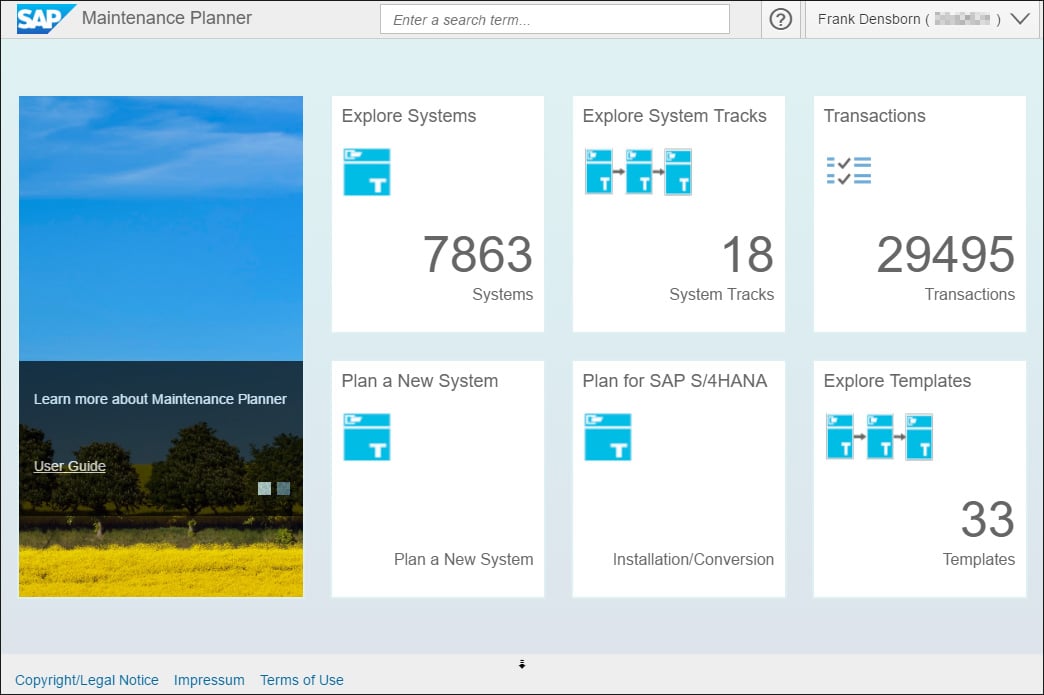
To easily download the necessary files, log on to the Maintenance Planner—a new tool that replaces the Maintenance Optimizer (see the figure below). The Maintenance Planner lets you plan new system installations, perform updates, and implement new or additional SAP products (for example, the frontend server for SAP Fiori).


SAP Fiori Maintenance Planner App


Tip: The following link provides more information on the Maintenance Planner: http://help.sap.com/maintenanceplanner


To start the Maintenance Planner, enter the following link into your web browser:

https://apps.support.sap.com/sap/support/mp


An SAP Fiori-based website opens, which you can access with your S-user credentials. For SAP partners, the partner user must be linked to the customer user to be able to view the customer’s systems. The Maintenance Planner helps you find and download the required installation files and provides the necessary documentation.


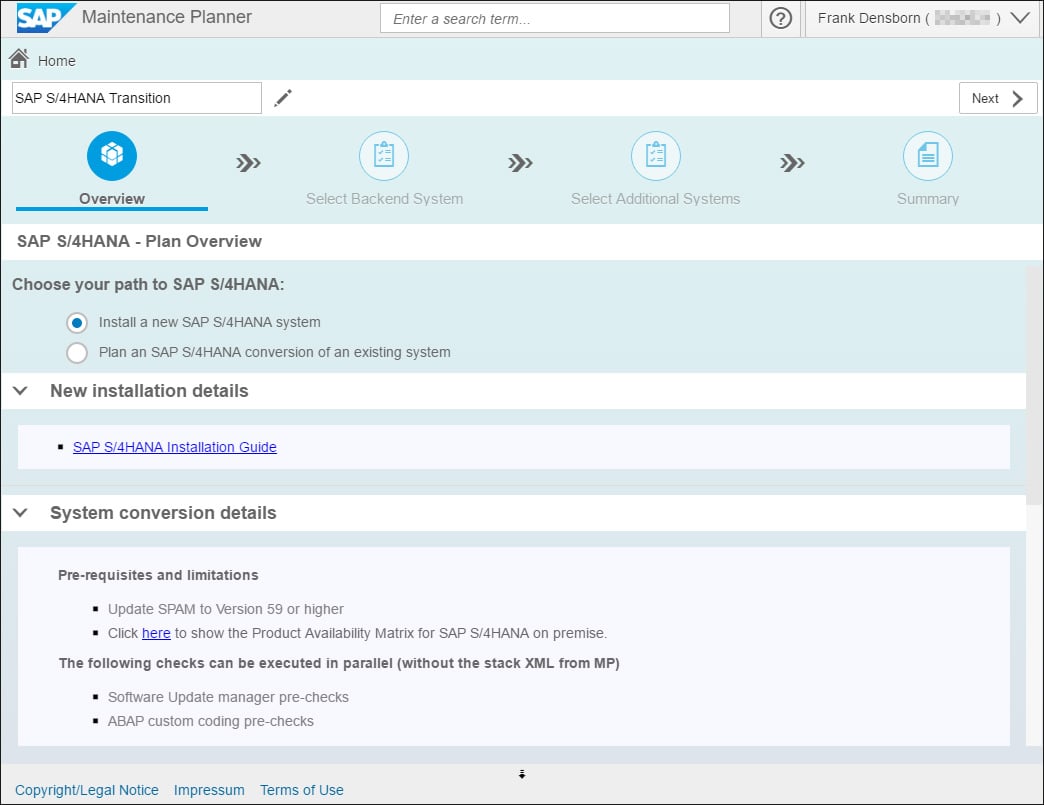
Not only can you use the Maintenance Planner to install new systems, but, as shown in the figure below, you can also use the Maintenance Planner for system conversions. The tool helps you search for add-ons, business functions, and industry solutions on the existing system and also lets you determine whether your system can be converted at all.


SAP Fiori Maintenance Planner App


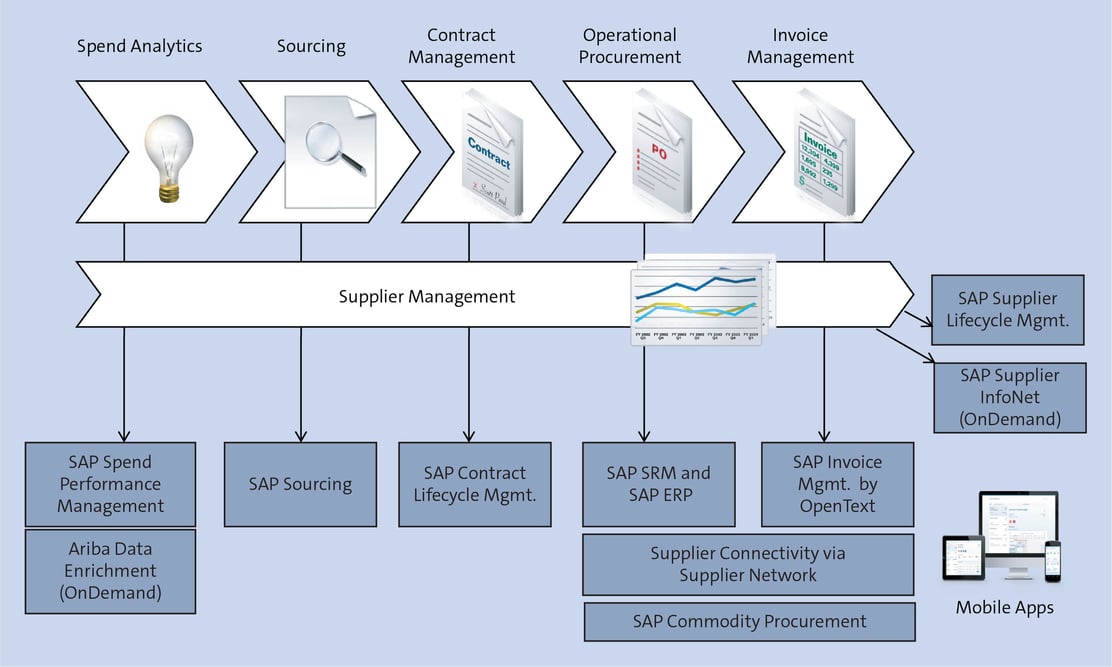
Go to the link shown in the previous figure to download the SAP S/4HANA Installation Guide (menu item New installation details), which will guide you through the individual installation steps. After you have completed the process, you can use the Push to Download Basket function (see figure below) to move the installation files to the Download Manager and directly download the files with this tool.


Supplier Management Flow


The PDF that you can download using Download PDF (see the figure above) also contains a link to the SAP Software Download Center in the SAP Support Portal. In addition, you’ll need the latest Support Package Manager (SPAM) version and—if it has not been installed yet—an SAP HANA database. The latest Software Update Manager (SUM) version should also be installed. Although mostly used for system conversion, you also use the SUM for initial patches during the new installation.


For the installation, you’ll need the operating system version specified in the Maintenance Planner (in our example, SUSE Linux) and the SAP HANA database version. (The specifications in the Maintenance Planner also contain information on the database version.) If SAP HANA is already implemented, you’ll need to patch the database to the version that you need for your SAP S/4HANA version, and you’ll have to create a new database container.


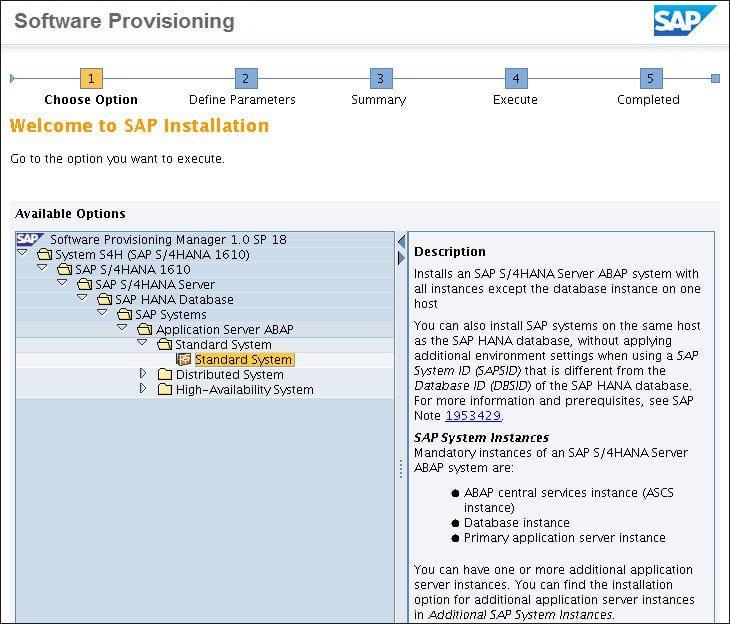
The Software Provisioning Manager (SWPM) then performs the actual SAP S/4HANA installation using the files you downloaded with the Maintenance Planner. This process follows the steps described in the installation guide (see figure below) and may take several hours.


Software Provisioning


Making Sure Your New SAP S/4HANA System Is Up to Date

After successfully installing a “naked” SAP S/4HANA system, you can use SUM to install the support packages you may need. (Please ensure that you’re using the latest version of the Software Update Manager.)


Before starting SUM, you can archive and backup your data. The SUM process can also take several hours. You can install add-ons with the SAP Add-on Installation Tool (Transaction SAINT) together with the Support Package Manager (Transaction SPAM).


Last Steps

Finally, you should perform some cleanup and use Transaction SPAU to make adjustments. Then, install the SAP Notes for your SAP S/4HANA version from SAP S/4HANA Release Notes using Transaction SNOTE and install the transports. Now, your SAP S/4HANA installation is complete. Congratulations!


Editor’s note: This post has been adapted from a section of the book Migrating to SAP S/4HANA by Frank Densborn, Frank Finkbohner, Jochen Freudenberg, Kim Mathäß, and Frank Wagner. Used with permission of SAP PRESS. All rights reserved.

Labels

sap hana hana database aws s4 hana hana db s4hana conversion steps sap hana azure bw4hana hana migration s4hana migration sap cloud migration steps sap hana migration steps sap hana migration to azure s4hana sap fiori fiori performance fiori erp s4 hana fiori sap fiori app sap fiori client sap fiori launchpad sap s4 hana fiori cisco ecc AI SAP AI abap dumps hana sap S/4HANA S/4HANA Conversion best sap ui5 & fiori training ccmsidb configuration database fiori tutorial on webide free sap ui5 & fiori training s/4 hana sap dumps sap fiori tutorial sap ui5 sap ui5 & fiori sap ui5 & fiori tutorial sara ui5cn 1514967 2367245 - Troubleshooting performance issues with SAP BPA Amazon free tier for SAP AWS setup Experience CALL_FUNCTION_NOT_FOUND CCMS Configuration and Use Create New Data Class in SAP (Oracle) Critical top SAP Abap dumps DHCP Clients Not Receiving IP Addresses Download Stack.xml HAN-DB HAN-DB-ENG Handling Spool & TemSe High CPU Usage Due to Excessive Process Switching How To How to Start and Stop SAP Hana Tenant Database How to change SAP Hana Sql Output results are limited to 5000 Records How to perform SAP Dual Stack Split - Netweaver Inactive Objects in SAP Intercompany transactions in SAP AP / AR : Cross Company Code Transaction Interface Flapping Due to Duplex Mismatch KBA LOAD_PROGRAM_LOST MSSQL shrinking transaction log file Migrating to SAP hana database NAT Overload Causing Internet Access Failure Note 500235 - Network Diagnosis with NIPING OSPF Adjacency Not Forming PRINCE2 Foundation Sample Questions Preparing for S/4HANA Conversion and the MUST know items Push to Download Basket S/4HANA Central note S/4HANA Migration Cockpit S/4JANA SAP BI Support Data Load Errors and Solutions SAP BI/BW Landscape SAP BPA SAP Basis SAP Basis Automation SAP Business Objects SAP CPS SAP Certification SAP FI Certification SAP FI Certification Sample Questions SAP HANA Admin - Cockpit SAP HANA DB Engines SAP HANA Database SAP HANA terminate session connection disconnect cancel kill hang stuck SAP Hana DB restore SAP Hana Numeric Error Codes SAP IS-Retail SAP Landscape SAP Language installation SAP MM and Purchase Order Tables SAP Maintenance Planner SAP Note 500235 SAP R/3 Glossary SAP Readiness Check SAP S/4HANA 1709 Installation Files SAP S/4HANA 2023 SAP S/4HANA 2023 Installation SAP S/4HANA 2023 running SAP S/4HANA Installation SAP Scheduling SAP Solman 7.2 CHARM: SAP Support Package Stack Strategy SAP Support package SAP Upgrade SAP support stack upgrade SP stacks STORAGE_PARAMETERS_WRONG_SET SUSE/SLES/Kernel versions Setup of S/4hana 2023 TSV_TNEW_PAGE_ALLOC_FAILED TSV_TNEW_PAGE_ALLOC_FAILED error Transaction ID Unable to download an SAP Note Unix/Linux Command That Are Helpful For SAP Basis Upgrading SAP Kernel Without Downtime Upgrading windows server 2008 to windows server 2019 What is OSS Notes? SAP SNOTE Tutorial accounting agile ale idoc ale/edi archive FI documents audit auditing auditor aws aws cloud basic type bluefield approach ccms charm copilot datavard dbacockpit download sap note download snote edi idoc electronic data interchange enable sap archiving objects erpprep ffid firefighter fraud functional hana admin how to apply sap security note https://www.erpprep.com/ idoc install install sap fiori installation interfaces intermediate document internal control license key linux version materials management messsage niping test order type port prince2 agile prince2 agile practitioner purchasing s/4hana upgrade s4 hana sap abap dumps sap abbreviations sap activate certification sap activate project manager sap authorization sap aws sap background job sap brownfield sap ccms sap ccms configuration sap erp sap error sap grc sap greenfield sap internet demo system sap kernel sap license sap maintenance certificate sap material management sap meaning sap mm sap mm consultant sap monthly security note sap netweaver sap network diagnostic sap niping sap note sap oss sap patch day sap performance sap performance issue sap purchase order sap s/4hana sap sales and distribution sap sap otc sap sd sap sd certification training sap sd course sap sd jobs sap sd module sap sd online training sap sd training sap sd tutorial sap sd tutorial for beginners sap security sap security note sap snote sap snote tutorial sap solution manager sap spooler sap sql segregation of duties separation of duties sles slicense sm37 smc snote snote in sap system sod conflict solution manager solution maneger stop start hana database suse linux techie trex two step upgrade required update sap kernel waterfall