Translate

Download & Upgrade SAP Kernel: Step by Step Tutorial

What is a Kernel?

  • The Kernel is a central program which acts as an interface between SAP application and operating system.
  • The Kernel consists of the executable programs that reside under the path "/sapmnt/<SID>/exe" (UNIX) or \usr\sap\SID\SYS\exe\run (Windows)
  • These files help startup the R/3 system, initialize the memory, create buffers and start managing the requests from users and effectively utilizing of hardware resources.
  • The kernel is also responsible for starting and stopping all the application services like dispatcher, message server, collector etc.

Why Kernel Upgrade?

  • SAP Kernel is the core of the application. Like all other applications, the Kernel contains the executable files (.EXE files for stating various processes in SAP).
  • The Kernel is the heart of the operating system. It contains those files which are used to run every event in SAP. E.g.|: starting database, shutdowns of the database, starting sap, shutdown of sap, saposcol, to uncar the sap files etc.
  • That's the reason why when a Kernel upgrade is done it means new versions of the various EXE files replace the older versions.

How to check Kernel Version?

There are many ways to check the Kernel Version -

Method 1) Logon to SAP system and go to SM51 à Release Notes
 
Download & Upgrade SAP Kernel: Step by Step Tutorial
Method 2) Logon to SAP system and go to System tab in the menu bar and select Status
 
Download & Upgrade SAP Kernel: Step by Step Tutorial
Method 3) Logon in operating system, switch to user <SID>adm and give the command disp+work

You can also give disp+work –version
 
Download & Upgrade SAP Kernel: Step by Step Tutorial

Download Kernel from Service Marketplace


Download & Upgrade SAP Kernel: Step by Step Tutorial
  • Go to "SAP Service Marketplace. " (https:\\service.sap.com) You will need your OSS ID and password.
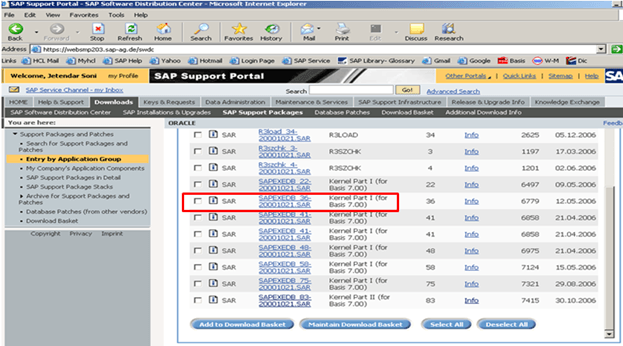
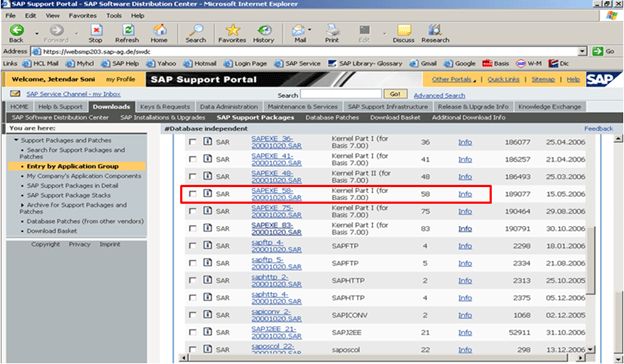
  • Then go to Downloads à SAP Support Packages -> Entry By Application Group -> SAP Kernel 6.00 64 Bit -> Select your OS (LINUX/WINDOWS/SOLARIS/AIX) -> Database Dependent and Database independent Kernel Patch.
  • Two SAR files SAPEXE.SAR and SAPEXEDB.SAR are downloaded from Service Marketplace.
Download & Upgrade SAP Kernel: Step by Step Tutorial
Database Independent
Download & Upgrade SAP Kernel: Step by Step Tutorial
Database Dependent: ORACLE

Kernel Upgrade Steps:

Step 1: Create a new Directory at OS level with enough space. Name of Dir can be "exe_new<ddmmyy>".
Step 2: Transfer these SAPEXEDB.SAR & SAPEXE.SAR files which you have downloaded to the new directory at OS level.
Step 3: Change your current directory to path .SAR files are created (cd /sapmnt/PR2/exe_new20122006). Check the directory path with command 'pwd' to ensure you are in the same dir (exe_new<ddmmyy>).
Step 4: Now uncompress these. SAR files by sapcar exe. The command used for the same would be
SAPCAR –xvf sapexe. SAR

SAPCAR –xvf sapexedb.SAR

Download & Upgrade SAP Kernel: Step by Step Tutorial
Step 5: Now create one more directory in that path with the name "exe_old<ddmmyy>". Take the backup of existing kernel.Copy (only copy not move) the existing kernel from exe directory to "exe_old<ddmmyy>"
Step 6: Now stop the SAP application. (For kernel upgrade the shutdown of database is not essential but we need to stop the SAP application)
stopsap r3
Step 7:
Then copy the files from the new kernel directory exe_new<ddmmyy> to the existing kernel directory exe

cp -rp /sapmnt/<SID>/exe_new<ddmmyy>/* /sapmnt/<SID>/exe/
Step 8: This will copy / replace all the files in the existing kernel directory with a new kernel files.
Then check the kernel version from OS level by the command disp+work. It should show that the patch number has been increased.
Step 9:
Then logon to OS level as root (specific to UNIX). In the kernel directory, there is a script called saproot.sh. Execute this script

./saproot.sh <SID>
Step 10: This script assigns the correct permissions to all the executable programs in the kernel such br* file etc...
Step 11:
Then start the SAP system

startsap r3
Step 12: Now you can also check the kernel version level from SM51 or by selecting system à status

No comments:

Labels

sap hana hana database aws s4 hana hana db s4hana conversion steps sap hana azure bw4hana hana migration s4hana migration sap cloud migration steps sap hana migration steps sap hana migration to azure s4hana sap fiori fiori performance fiori erp s4 hana fiori sap fiori app sap fiori client sap fiori launchpad sap s4 hana fiori cisco ecc AI SAP AI abap dumps hana sap S/4HANA S/4HANA Conversion best sap ui5 & fiori training configuration database fiori tutorial on webide free sap ui5 & fiori training s/4 hana sap dumps sap fiori tutorial sap ui5 sap ui5 & fiori sap ui5 & fiori tutorial sara ui5cn 2367245 - Troubleshooting performance issues with SAP BPA Amazon free tier for SAP AWS setup Experience CALL_FUNCTION_NOT_FOUND CCMS Configuration and Use Create New Data Class in SAP (Oracle) Critical top SAP Abap dumps DHCP Clients Not Receiving IP Addresses Download Stack.xml HAN-DB HAN-DB-ENG High CPU Usage Due to Excessive Process Switching How To How to Start and Stop SAP Hana Tenant Database How to change SAP Hana Sql Output results are limited to 5000 Records How to perform SAP Dual Stack Split - Netweaver Inactive Objects in SAP Intercompany transactions in SAP AP / AR : Cross Company Code Transaction Interface Flapping Due to Duplex Mismatch KBA LOAD_PROGRAM_LOST MSSQL shrinking transaction log file Migrating to SAP hana database NAT Overload Causing Internet Access Failure Note 500235 - Network Diagnosis with NIPING OSPF Adjacency Not Forming PRINCE2 Foundation Sample Questions Preparing for S/4HANA Conversion and the MUST know items Push to Download Basket S/4HANA Migration Cockpit S/4JANA SAP BI Support Data Load Errors and Solutions SAP BI/BW Landscape SAP BPA SAP Basis SAP Basis Automation SAP Business Objects SAP CPS SAP Certification SAP FI Certification SAP FI Certification Sample Questions SAP HANA Admin - Cockpit SAP HANA DB Engines SAP HANA Database SAP HANA terminate session connection disconnect cancel kill hang stuck SAP Hana DB restore SAP Hana Numeric Error Codes SAP Landscape SAP Language installation SAP MM and Purchase Order Tables SAP Maintenance Planner SAP Note 500235 SAP R/3 Glossary SAP Readiness Check SAP S/4HANA 1709 Installation Files SAP S/4HANA 2023 SAP S/4HANA 2023 Installation SAP S/4HANA 2023 running SAP S/4HANA Installation SAP Scheduling SAP Solman 7.2 CHARM: SAP Support Package Stack Strategy SAP Support package SAP Upgrade SAP support stack upgrade SP stacks STORAGE_PARAMETERS_WRONG_SET SUSE/SLES/Kernel versions Setup of S/4hana 2023 TSV_TNEW_PAGE_ALLOC_FAILED TSV_TNEW_PAGE_ALLOC_FAILED error Transaction ID Unable to download an SAP Note Unix/Linux Command That Are Helpful For SAP Basis Upgrading SAP Kernel Without Downtime Upgrading windows server 2008 to windows server 2019 What is OSS Notes? SAP SNOTE Tutorial accounting agile ale idoc ale/edi archive FI documents audit auditing auditor aws aws cloud basic type bluefield approach ccms ccmsidb charm copilot datavard dbacockpit download sap note download snote edi idoc electronic data interchange enable sap archiving objects erpprep ffid firefighter fraud functional hana admin how to apply sap security note https://www.erpprep.com/ idoc install install sap fiori installation interfaces intermediate document internal control license key linux version materials management messsage niping test order type port prince2 agile prince2 agile practitioner purchasing quick info s4 hana sap abap dumps sap abbreviations sap activate certification sap activate project manager sap authorization sap aws sap brownfield sap ccms sap ccms configuration sap erp sap error sap grc sap greenfield sap internet demo system sap license sap maintenance certificate sap material management sap meaning sap mm sap mm consultant sap monthly security note sap netweaver sap network diagnostic sap niping sap note sap oss sap patch day sap performance sap performance issue sap purchase order sap s/4hana sap sales and distribution sap sap otc sap sd sap sd certification training sap sd course sap sd jobs sap sd module sap sd online training sap sd training sap sd tutorial sap sd tutorial for beginners sap security sap security note sap snote sap snote tutorial sap solution manager sap sql segregation of duties separation of duties sles slicense smc snote snote in sap system sod conflict solution manager solution maneger stop start hana database suse linux techie trex two step upgrade required waterfall