SAP HANA Admin - Cockpit
This is a management solution for your SAP HANA system that uses SAP Fiori Launchpad navigation to access a wide range of HANA applications. A web browser is required to access the SAP HANA cockpit.
You can also utilise SAP HANA Cockpit offline to execute administration activities, such as starting the HANA system to resolve performance issues.
The content is displayed in the SAP HANA Cockpit using Fiori-based Launchpad as tiles placed in groups. You can access particular programmes as well as app-specific data for instant inspection using these tiles.
You may also drill down into these tiles to see more details about specific applications.
To launch and use the tile-based SAP HANA Cockpit, you'll need the following roles: sap.hana.admin.roles:: Monitoring or sap.hana.admin.roles:: Administrator
To use a web browser to access SAP HANA Cockpit, your browser must support the SAPUI5 library sap.m.
HANA Studio can also be used to access SAP HANA Cockpit. Open SAP HANA Cockpit from the HANA system's Configuration and Monitoring menu.
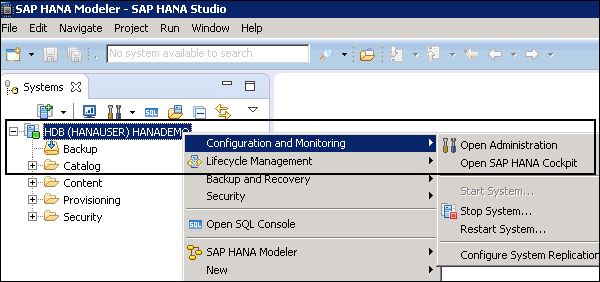
The following URLs can be used to access a single-container system:
https://<host_FQDN>:43<instance>/sap/hana/admin/cockpit
https://<host_FQDN>:80<instance>/sap/hana/admin/cockpit
The SAP HANA system name is the host name, and the SAP HANA system Instance number is the SAP HANA system Instance number.
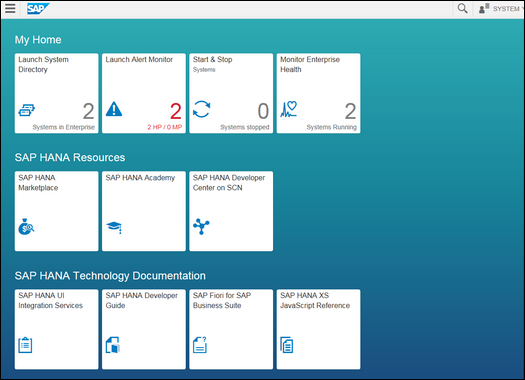
SAP HANA Cockpit for Offline Administration
You can alternatively use a web browser or the standard SAP HANA Cockpit tool to access HANA Cockpit in an offline mode. This is used for administrative duties such as launching the SAP HANA system and doing other offline administration tasks.
The following prerequisites must be completed in order to login to SAP HANA Cockpit for offline administration: You must have credentials for Operating System user sid> admuser created at the time of installation.
- Port 1129 should be open for communication.
- You need to have browser support SAPUI5 library sap.m.
There are two ways to open SAP HANA Cockpit in an offline mode −
Using the Web Browser
Enter the following URL in the web browser.
https://<host>:1129/lmsl/hdbcockpit/<sid>/index.html
You can open SAP HANA Cockpit for offline administration by typing the given URL into your web browser. You must log in as the operating system user admuser (sid>).
This method is not advised because it sends the password via HTTP in plain text.
Using the Standard SAP HANA Cockpit
You can open SAP HANA cockpit by entering the following URL.
https://<host_FQDN>:43<instance>/sap/hana/admin/cockpit
Go to the SAP HANA Database Administration group in SAP HANA. As seen in the second final box of the accompanying screenshot, select SAP HANA Cockpit for offline administration.
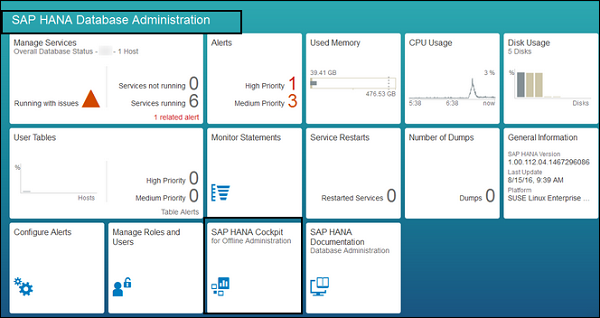
When you click on the settings in SAP HANA Cockpit for offline mode, as seen in the following screenshot, you will see a variety of possibilities.
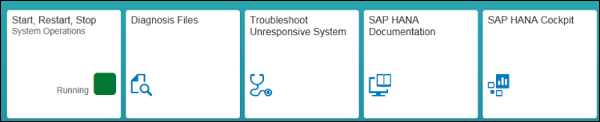
Start, Restart and Stop
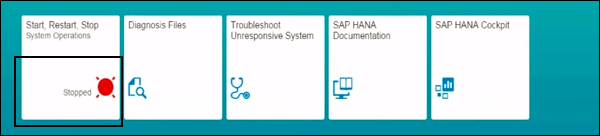
The state of your SAP HANA system is displayed in this tile. The most common status messages that you can view are as follows:
- Running
- Stopping
- Stopped
- Initializing
When you click on this tile, it allows you to start, stop, and restart a server.
Diagnosis Files
This is the programme that is used to open log files, trace results, and other diagnostic files. This tile can be used to download diagnosis files in zip format, which can then be added to support messages.
Searching diagnosis files for certain terms and phrases is also feasible.
Troubleshoot Unresponsive System
This tile gives you access to the data you'll need to troubleshoot performance issues.
SAP HANA Documentation Tile
You may view documentation for all administrative actions that you can conduct in SAP HANA Cockpit for offline administration using this tile.
SAP HANA Cockpit
This tile opens the main window, from which you can access all of the programmes for managing SAP HANA online. This option is only available with the primary system in the case of system replication.
Note: When you utilise the Start option under SAP HANA Cockpit offline administration - Star, Restart, Stop tile - Footer bar, Start System - this option restarts all tenant database systems in multitenant database containers.
When you stop a system, the state of the system is changed to Stopped (red) beneath the Start, Restart, and Stop tile, as shown in the accompanying screenshot.

4 comments:
nice post.
salesforce training
hadoop training
mulesoft training
nice post.
hadoop training
mulesoft training
linux training
power bi training institute
tableau training
hyperion online training
oracle sql plsql online training
go langaunage online training
azure online training
Post a Comment